
SI Tickets
SI Tickets by Sports IllustratedEvents
3.327.00 Reviews
- Version
- 4.05
- Installs
- 50.00K
- Age Rating
- Everyone
Screenshots
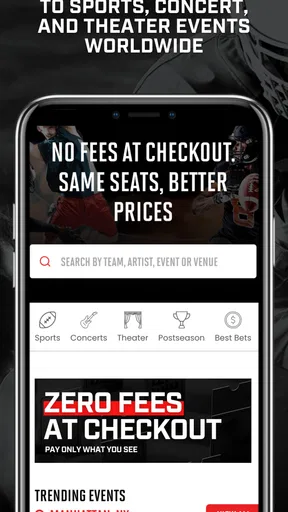
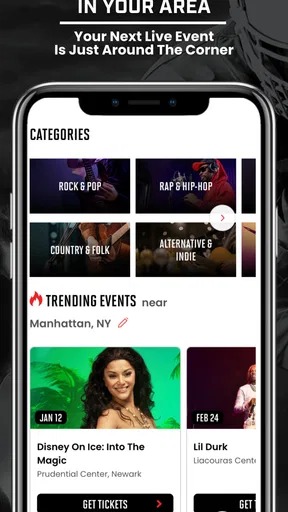
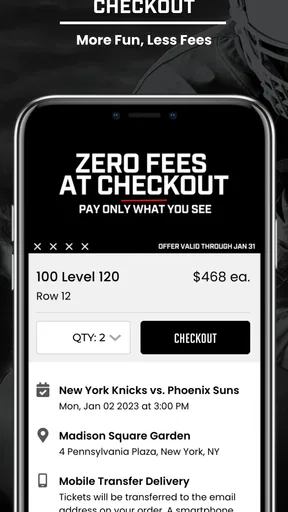
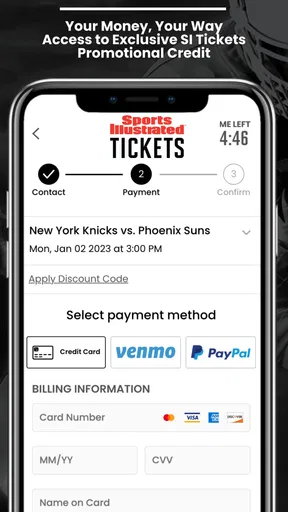

Our Review of SI Tickets
 Analysis by Appyee
Buying a ticket is usually the easy part; the stressful moment comes later, when I am standing outside a venue, checking my phone, and hoping the app opens before the line moves. That is the situation I had in mind while looking at SI Tickets, an events app from SI Tickets by Sports Illustrated. It is free, aimed at everyone, and built around getting people back to live events rather than turning ticket discovery into a complicated project.
My overall impression is practical rather than flashy. The app makes the most sense for someone who wants a dedicated place to handle event tickets on a mobile device, especially when convenience matters more than having a huge collection of extra entertainment tools. It is not the kind of app I would install simply to browse endlessly. I see it as something to keep ready before an event, then rely on when plans become real.
There is also a useful distinction between the app’s purpose and the broader ticket-buying experience. A ticket app can feel quick while browsing but still become frustrating during the final minutes before entry. That is why I paid attention not only to what SI Tickets is meant to do, but also to how it fits into a realistic event-day routine: finding the right purchase, opening the relevant information, and recovering calmly if the phone, connection, or app needs another attempt.
How SI Tickets feels during ordinary use
The first thing I noticed is that SI Tickets has a focused identity. Its category is Events, and the developer, SI Tickets by Sports Illustrated, keeps the concept tied to live attendance. That focus is helpful when I do not want a general-purpose marketplace mixed with unrelated shopping, social, or media features. I can approach it with one question: can this help me manage the ticket side of going out?
For normal use, I would expect the experience to feel most comfortable when I prepare in advance. Installing it before leaving home gives me time to sign in, review the event information, and make sure I know where to look when the ticket is needed. That simple habit matters more than trying to solve everything while walking toward a crowded entrance.
In my experience with event apps, perceived speed is strongly affected by context. Browsing at home on a stable connection feels very different from opening an app in a packed stadium or concert area. SI Tickets benefits from being treated as a prepared tool, not as something I should first explore while a queue is waiting behind me. I would open it once before the day of the event, close unnecessary apps, and check that the phone has enough battery for the journey.
The app’s free price lowers the barrier to trying it. That does not automatically make it the best option for every purchase, because ticket availability and the details of a particular event still matter, but there is little reason not to examine it if its event coverage matches what I want. The age rating of Everyone also makes it approachable for a broad audience, including families planning an outing together.
Where the app can save time
The strongest time-saving idea is having the relevant ticket experience in one mobile destination instead of searching through email, browser tabs, and messages. I find this especially useful when several people are attending and I need to remember which confirmation belongs to which event. A dedicated app gives me a clearer starting point than an inbox search performed under pressure.
My practical workflow would be to complete the purchase or ticket setup while relaxed, then revisit the app later rather than repeatedly searching for the original transaction. Before leaving, I would check the event name and date, confirm that I am looking at the correct ticket, and make sure the phone is not in a state that could interrupt access. This is not a glamorous feature, but it is the kind of preparation that prevents a small mistake from becoming an entrance problem.
Another useful trade-off is that a focused app may be easier to understand than a broad ticket marketplace, but it may not replace every alternative. A general ticket service can be more convenient if I already use it for many venues or want to compare a wide range of listings in one place. SI Tickets is more appealing when its connection to the event I want is direct and the mobile experience is the priority.
What happens when usage becomes demanding
The heaviest-use moment is not necessarily browsing. It is the short period before entry, when many people may be checking their phones, moving through a venue, and trying to display the correct information quickly. That is where I would judge the app most seriously. A smooth experience at home is reassuring, but the real test is whether I can return to the right screen without confusion after the phone has been locked or another app has been used.
I would avoid relying on a last-second launch. Instead, I would open SI Tickets before reaching the gate and keep the device ready. If the venue has poor reception, any online ticket service can feel slow regardless of how simple its interface is. That is an important limitation: an app cannot remove every problem caused by a crowded network, a weak signal, or a nearly empty battery.
For a family outing, I would also decide in advance who is responsible for the tickets. Passing one phone between several people can create needless friction, particularly when everyone is moving. If tickets are distributed across different accounts or devices, each person should check their own access before leaving. This kind of planning is more valuable than assuming the app will fix an unclear group arrangement at the entrance.
SI Tickets is therefore best judged as part of a complete routine. I would not call it a magic solution for event-day pressure. I would call it a useful central point that works better when I prepare the details before the busiest moment. That distinction is important for anyone choosing between a dedicated app and simply keeping a confirmation email open.
Stability, recovery, and sensible preparation
Reliability in a ticket app has two sides. One is whether the app behaves consistently during ordinary navigation. The other is how easily I can recover when something goes wrong. A failed opening, an interrupted connection, or an accidentally closed screen does not necessarily mean the ticket is lost, but it can feel alarming when time is limited.
My advice would be to test the complete route before the event, not just install the app. I would open the application, locate the event, and return to the ticket area. Then I would lock the phone and try again later. This small rehearsal shows whether I remember the path and gives me a chance to notice account or device issues while there is still time to solve them.
If the app needs another attempt at the venue, I would move away from the densest part of the queue if possible, check the connection, and reopen it without repeatedly tapping every control. A calm retry is usually better than creating several overlapping actions. I would also keep the phone charged and carry the basic purchase information separately, such as the event details in my email, so I have a reference if I need to troubleshoot.
That backup habit does not make SI Tickets less useful. It reflects the reality that event access is important enough to deserve redundancy. I use the app as the main tool, but I do not treat any phone-based ticket method as the only thing I should remember. People who dislike this kind of preparation may prefer buying or managing tickets through a service they already know well, especially if its support and recovery process is familiar to them.
The app has an average rating of 3.3 from around a hundred ratings, with a smaller set of written reviews behind that score. I read that as a sign to keep expectations balanced. It is not a clear signal that every user will have the same experience, and it is certainly not a reason to assume the app is unusable. For me, it means I would test my own event workflow early rather than trusting a rating to answer every practical question.
Device limits and everyday performance
SI Tickets supports Android devices running version 8.0 or later, which gives it a reasonably broad technical reach for people who are not using the newest phone. That matters for event planning because not everyone wants to replace a perfectly serviceable device just to access a ticket app. At the same time, an older phone may have less free storage, a weaker battery, or more difficulty switching between apps under pressure.
I would keep the app updated to its current version, 4.05, and leave enough free space for normal phone operation. I would also avoid beginning a ticket check with a long list of demanding apps open in the background. These are simple steps, but they improve the odds of a responsive experience on a device that has seen several years of everyday use.
Resource demands are difficult to separate from the phone itself and the surrounding network. A modern device with plenty of battery should make the basic interaction feel less stressful than an older handset already struggling with storage or power. If my phone is slow across the board, I would not blame SI Tickets alone; however, I would still consider whether a browser-based alternative is easier on that particular device.
There is also a usability trade-off between using the app and using a mobile website. The app gives me a dedicated place to return to, which is valuable when I have several browser tabs open. A website may be preferable if I rarely attend events, do not want another installed application, or need to switch quickly between different ticket providers. I would choose SI Tickets when repeated access and a focused event workflow outweigh the convenience of staying in a browser.
Who should use it and who should look elsewhere
I think SI Tickets is a good fit for people who attend live events often enough to appreciate a dedicated ticket destination. It is also suitable for someone who wants a free, straightforward starting point and prefers handling event information on a phone. Families can use it as part of a shared plan, provided they decide beforehand how tickets will be accessed and who will manage them.
I would be more cautious if I only attend one event and already have a reliable ticket method through another service. Installing a new app at the last minute creates unnecessary risk. I would also look elsewhere if my main goal is broad comparison across many ticket marketplaces, because a specialized service may not be as convenient as the platform where I already search and organize everything.
People with older phones should not automatically exclude it, since the minimum operating-system requirement reaches back to Android 8.0. Still, they should check the app before event day and consider battery life, available storage, and connection quality. Someone who wants an experience that requires no preparation may find a familiar browser or an established ticket wallet more comfortable.
One non-obvious strength is that the app encourages me to separate discovery from attendance. I can decide on the event earlier, then use the phone later as a practical access tool. One non-obvious weakness is that this benefit disappears if I do not remember the account or event path. The app is only as convenient as my preparation when the entrance is busy.
How it compares with common ticket alternatives
The usual alternatives are a mobile browser, an email confirmation, or a broader ticket marketplace. Email is excellent as a record, but it can be awkward when I need to search through unrelated messages or load a long confirmation under pressure. A browser is flexible and avoids another installation, but tabs can be closed, sessions can expire, and the experience may feel less focused.
A general marketplace may win when I want a large selection, price comparison, or one account covering many types of events. SI Tickets is more attractive when I value a dedicated route to the live-event experience and do not want to manage the ticket through a cluttered inbox. The right choice depends on whether my priority is discovery breadth or a focused mobile workflow.
I would not use the app simply because it carries the Sports Illustrated name. I would use it when the event and ticket path make sense for me. The developer identity gives the app a clear event-oriented character, but branding alone cannot compensate for a poor match with my needs. I still want to check the event details, prepare the phone, and understand how I will retrieve the ticket before committing to the day.
My performance verdict after fitting it into a real outing
Imagine I am meeting friends for a game or show. Earlier in the day, I open SI Tickets, find the relevant ticket, and make sure I recognize the correct event. On the way there, I avoid draining the battery with unnecessary activity. Near the venue, I open the app before reaching the queue, then keep the phone ready instead of waiting until an attendant asks for it.
If everything loads normally, the app has done exactly what I need: it has reduced the distance between my ticket and the moment I use it. If the connection is weak, I know to step aside and retry rather than panic. If I forget the route, I have already practiced it. That is where I see the real value—not in replacing common sense, but in giving my event preparation a clear home.
The app has reached over fifty thousand installs, so it is not an obscure experiment, but its modest rating tells me to remain realistic. I would describe performance as potentially comfortable for prepared, ordinary use, while treating busy entrances and unreliable connections as situations that require a backup plan. I would not promise a frictionless experience for every phone or every venue.
For me, the final decision is simple: I would try SI Tickets if I wanted a free event-focused app and my ticket needs fit its ecosystem. I would install it ahead of time, test the route, and keep the phone charged. I would skip it when another provider already handles my events smoothly or when I need a broader marketplace first. The best reason to choose it is focused preparation, not last-second rescue.
That makes SI Tickets a useful option for Android users on supported devices who want a dedicated way to approach live-event tickets. It is not a replacement for planning, connectivity, or a sensible backup, but it can make the ticket side of an outing feel more organized. In my view, that is a fair and practical role for SI Tickets: a tool I would keep ready for the right event, while still choosing the alternative that best matches my buying habits.
Verdict
Strengths of SI Tickets
- Quickly access and manage tickets from your mobile device.
- Useful for checking event details, dates, and venue information.
- Digital tickets reduce the need to carry printed confirmations.
- Convenient for presenting tickets at supported entrances.
- Helps keep ticket information organized in one place.
Limitations of SI Tickets
- Features may depend on the event organizer’s support for the platform.
- An internet connection may be required to load or validate tickets.
- Ticket transfers, refunds, or cancellations may have restrictions.
- The app may offer limited value outside supported events or venues.
- Login or account issues could make ticket access inconvenient at entry.
Similar Picks in This Category
View All
Easy Quran Mp3 Audio Offline
Muslim Worldapp4.7

Invitation Maker: Cards & RSVP
Greetings Island4.9

StubHub - Live Event Tickets
StubHub4.3

Fever: Events & Tickets
Fever Labs4.7

Epic Freebie Games Radar
Arioch Pds - Apps & Games4.4

Invitation card Maker, Design
Splendid App Maker4.9
Frequently Asked Questions
What is SI Tickets, and what can I use it for?
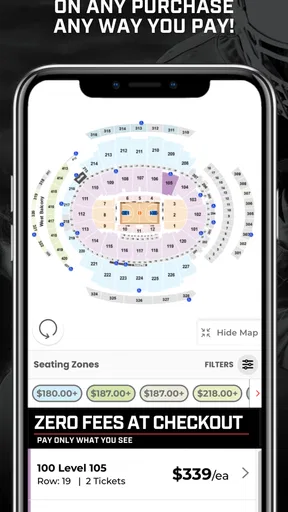
SI Tickets is a mobile ticketing application designed to help users discover, purchase, and manage tickets for supported events, venues, or transportation services, depending on the region and provider. After installing it, you can typically browse available listings, review event details, select ticket options, complete payment, and access purchased tickets directly from your phone instead of relying on a printed ticket.
Is SI Tickets available for both Android and iPhone?
SI Tickets may be available for Android and iOS, but availability can vary according to your country, device compatibility, and the specific service connected to the application. Before downloading, check the official Google Play Store or Apple App Store listing to confirm the supported operating system, minimum version requirements, developer information, and whether the app is offered in your region.
Do I need to create an account to buy or use tickets?
In most cases, SI Tickets requires users to register or sign in before purchasing tickets, because the account is used to store orders, receipts, customer details, and digital passes. Some features may be accessible without an account, such as browsing events, but ticket management and entry generally work more reliably when you use the same account and email address used during checkout.
How do I access and use a ticket purchased through SI Tickets?
Once a purchase is completed, the ticket will normally appear in the application under an orders, tickets, or bookings section, and confirmation details may also be sent by email. Open the relevant ticket before arriving at the venue and make sure the barcode or QR code is clearly visible. Keep your phone charged, and follow any event-specific identification or entry instructions.
Are SI Tickets purchases refundable or transferable?
Refund, cancellation, exchange, and ticket-transfer rules are usually determined by the event organizer, venue, operator, or ticket provider rather than solely by the application. Read the terms shown before payment and keep your confirmation email for reference. If a problem occurs, contact SI Tickets support or the organizer promptly, including your order number and relevant purchase details.
